Count calories from a photo
Vitaloop Labs
To count the calories in a meal from a photo, take the picture in vitaloop's meal chat: the app recognises the foods on the plate, estimates how many grams of each there are and shows the calories, macros and every other nutrient before anything is saved. Logging by photo is a Pro feature; the rest of logging is free, with no ads.
vitaloop is free and has no ads. Without paying, you log foods, drinks and supplements by search, by barcode scan or from your frequent meals, and see the calories, macros, vitamins and minerals of every meal. On the Analytics dashboard you follow 5 micronutrients you choose yourself and can swap at any time.
With Pro, a photo, a voice note or a typed sentence in the chat becomes a logged meal. It works in English, Spanish and Catalan, on iPhone, iPad and Android, and is available in Spain.


For iPhone and iPad, and for Android phones and tablets.
Apple, the Apple logo and Apple Health are trademarks of Apple Inc., registered in the U.S. and other countries. App Store is a service mark of Apple Inc. Google Play and the Google Play logo are trademarks of Google LLC.
What the chat does with your photo
A photo, your voice or a sentence
Take the photo, say what you ate or type it the way you would say it: “porridge with banana and a white coffee”. The chat splits the meal into foods, estimates each amount and replies in a sentence or two saying what it assumed. Nothing is saved until you confirm it.
It asks when it is unsure
When a food could be more than one thing (a green or a gold kiwi, a red or a green pepper), its row offers the options and one tap settles it. A gold kiwi carries considerably more vitamin C than a green one, so the choice changes the result.
Values from a food database
The AI works out what is on the plate and how much; the calories and nutrients of each food come from vitaloop's food database, built on the USDA FoodData Central and ANSES-CIQUAL composition tables. Every food arrives with its 42 fields: energy, macros, fibre, sugars, fat types, 13 vitamins, 13 minerals, water, alcohol and caffeine.
Any row can be corrected
If the chat picked the wrong food, tap the row and search for the right one; it takes the old one's place at the same weight. Grams are editable in place too, and you can keep typing: “no bread”, “it was twice that”, “and a beer”.
Dishes, as one card
A paella arrives as one card with its total and opens to the rice, the seafood and the rest, each with its own grams. A pizza with toppings stays one card with the base as its first row, while things that are not one dish, such as a yoghurt and an apple, stay separate.
What it looks like
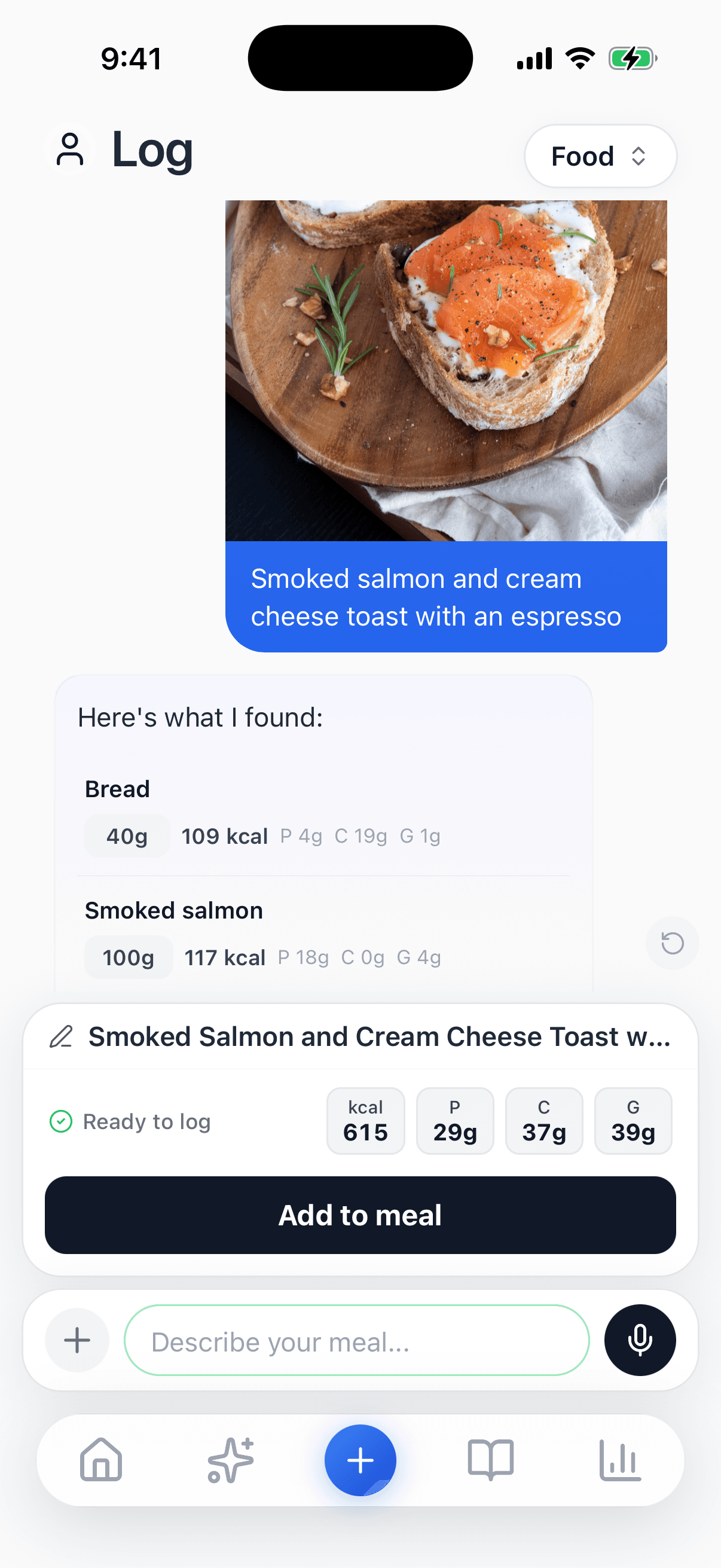
A photo and a line of text: each food with its grams and calories, before saving.
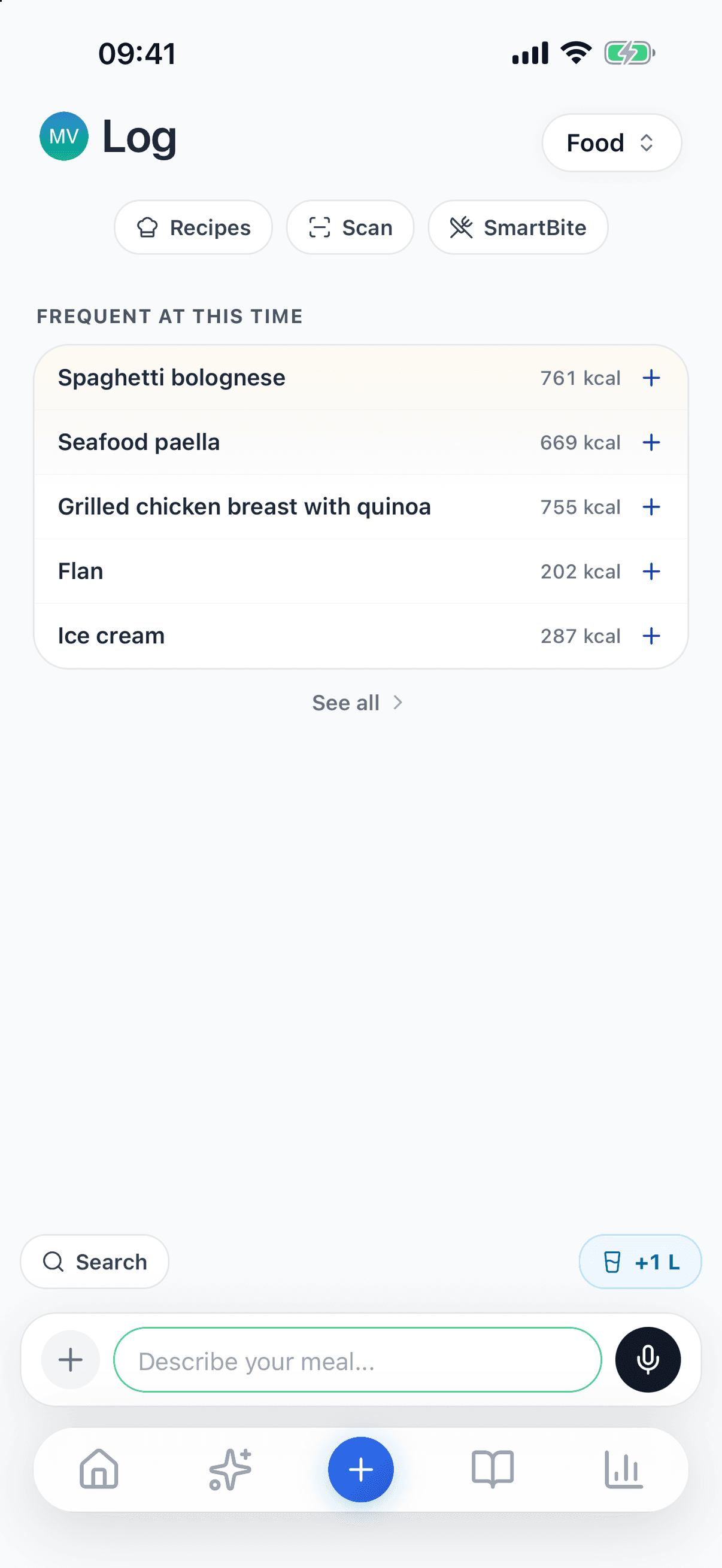
Without Pro: search, barcode scan and your frequent meals.
What a photo cannot see
A photo shows the surface of the plate. The oil in the pan, the butter on the toast, the sugar in the coffee or the sauce under the rice are not in it, and a portion can look larger or smaller depending on the plate and the angle. That is why the grams are an estimate, and why the chat tells you what it assumed: a food's usual portion, or the oil in a dressing you didn't mention.
Two habits help. Add what the camera can't see (“with a tablespoon of oil”, “sugar in the coffee”), and correct the grams when you know them: if you weighed the rice, type the number.
Logging a meal from a photo
- 1
Open the meal chat
It is on the log tab. Tap + to take a photo or pick one from your library; the microphone is for dictating.
- 2
Add a sentence if needed
Whatever the photo doesn't show: the oil, the sugar, whether the bread was wholemeal.
- 3
Check what it understood
Every food with its grams and calories. Pick an option if it asks, swap a row or adjust the grams.
- 4
Add it to the meal
It counts towards your day (calories, macros, vitamins and minerals) together with anything you logged in other ways.
What is free and what needs Pro
Free, with no ads: logging foods, drinks and supplements by search, barcode, frequent meals, your recipes or by hand; the calories, macros and every nutrient of each meal; calorie and macro targets; and 5 micronutrients of your choice on the Analytics dashboard. Logging by photo, voice or text in the chat needs Pro (9,90 €/month or 49,90 €/year) or Max (14,90 €/month or 69,90 €/year: the same features, with a larger daily AI allowance). Annual plans usually start with a 7-day free trial; the store decides who is eligible.
Which composition tables we use, which reference values each nutrient is compared with, and where the data has limits: how we calculate.
Questions about counting calories from a photo
Can you count calories from a photo?+
Yes, as an estimate. In vitaloop you photograph the plate in the meal chat, and the app identifies the foods, estimates the grams and works out calories, macros, vitamins and minerals from the values in its food database. What the photo can't see (cooking oil, a sauce underneath, sugar in the coffee) you add in a sentence, and every amount can be corrected before saving.
Is counting calories from a photo free in vitaloop?+
No. Logging by photo, voice or text with AI is part of Pro (9,90 €/month or 49,90 €/year) or Max. What is free, with no ads, is logging by search, barcode scan, frequent meals or your recipes, and seeing the calories, macros and micronutrients of what you eat.
How accurate is a calorie count from a photo?+
As accurate as what the photo shows. The two sources of error are the portion, which is estimated from the image, and what can't be seen, such as cooking oil. Weigh a food and type the grams, and that amount is no longer an estimate.
Where do the calories and nutrients come from?+
From vitaloop's food database, built on the USDA FoodData Central and ANSES-CIQUAL tables, with Open Food Facts for packaged products. The AI identifies the foods and the amounts; it does not generate the values of each food. Nutritional data may contain inaccuracies: check the label for anything that matters to you.
What happens to my photos?+
To be analysed, photos, voice notes and descriptions are sent to our AI provider in the United States, under standard contractual clauses and without being retained. That only happens if you give a separate permission for the AI features; without it, manual logging works the same. Your data is stored on servers in the EU.
What vitaloop is not
vitaloop is a personal nutrition and data-logging app developed by Vitaloop Labs, SL. It is not a medical device under Regulation (EU) 2017/745 and does not constitute professional medical advice. Suggestions are based on your personal data and are not a substitute for advice from a qualified healthcare professional. Nutritional data may contain inaccuracies; always verify critical information on product labels.